When you open the freezer door to grab some ingredients for lunch, the first thing you notice is that it’s not as cold as it should be. In fact, it might even feel warm. A quick look at the temperature display confirms your worst fears — the “FF” error code is displayed, signaling a potential issue with the freezer fan.
Freezer fans, also known as evaporator fans, play a crucial role in maintaining the proper temperature inside your refrigerator and freezer. These fans circulate air over the evaporator coils, ensuring that the cool air is distributed evenly throughout the appliance. If the fan isn’t functioning correctly — due to ice buildup, a broken motor, or an obstruction — your fridge may struggle to maintain the right temperature, putting your food and drinks at risk.
The “FF” error code is one of the most common indicators of a malfunctioning freezer fan. It can also be accompanied by a grinding or scraping sound, which often points to issues with the fan itself.
Before diving into troubleshooting, it’s important to take all your groceries out of the freezer and store them in another refrigerator or cooler. This will make it easier to inspect the fan and identify the root cause of the problem. You’ll also need a flashlight, some towels, and a screwdriver to remove the freezer fan cover.
Steps to Troubleshoot the “FF” Error Code
Listen for unusual sounds
Start by listening for any scraping or grinding noises coming from the freezer. This usually indicates that the fan is working but is blocked by ice. Check the back wall of the freezer, especially around the vents, for any signs of ice or frost. If you find ice buildup, defrost your freezer by unplugging the refrigerator and propping the door open. To speed up the process, place a bowl of boiling water in the freezer for 30 minutes. Be sure to have plenty of towels on hand to clean up any excess water.Check for ice buildup
After defrosting, plug the refrigerator back in and allow it to return to its normal operating temperature. Check the temperature panel to see if the “FF” code reappears. If it does, there may still be an issue with the fan or the cooling system.Inspect the vents
Ensure that the vents are clear of any obstructions. Look for tears or debris on the freezer door seal that could prevent it from closing properly. A faulty seal can lead to improper cooling and increased energy consumption.Examine the fan
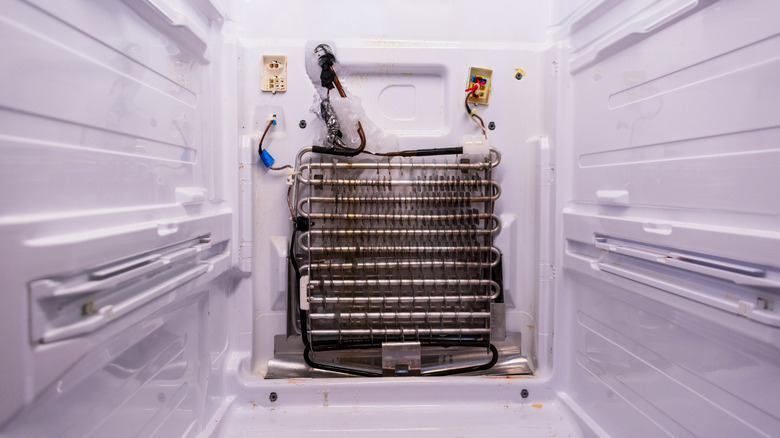
Unplug the refrigerator and locate the fan, which is typically found at the back of the freezer. Remove the cover and visually inspect the fan for any damage or blockages. Rotate the blades with your finger to see if they move smoothly. If they don’t, the fan motor bearing may be faulty and require replacement.Try a reset
If no obvious issues are found, try resetting the refrigerator. Unplug it for five minutes, then plug it back in and check for the error code. If the noise persists, the freezer remains warm, or the “FF” code continues to appear, it may be time to call a professional technician — especially if your appliance is still under warranty.Consider professional help
While some issues can be resolved with basic troubleshooting, more complex problems may require the expertise of a qualified repair service. A professional can diagnose and fix underlying issues that may not be immediately visible.
If you’re looking for more tips on maintaining your refrigerator and other household appliances, consider signing up for the House Digest newsletter. You’ll receive expert advice on home maintenance, DIY projects, and design inspiration. Additionally, you can add us as a preferred search source for easy access to helpful content.
For more information, visit the original article on House Digest.